AI BASED BLOG TOOL · MACOS & WINDOWS

Turn any video into a finished
blog post. On your own computer.

Paste a link. ReelBlog writes the article, grabs screenshots, adds SEO and publishes to your site. The AI runs locally — no monthly bill, no data leaving your machine.

Free to try · first 2 videos on us · no card required

Ready to skip the trial? Get lifetime access from $99 →

The ReelBlog desktop app showing a finished blog post next to its SEO panel and extracted video frames
12,400+
Articles generated
< 10 min
From video to draft
8 platforms
Direct publishing
Local AI
No subscription needed

The problem

Your video exists. Your blog post doesn't.

You spend hours creating great videos — tutorials, reviews, walkthroughs — but only a fraction of that audience ever reads text. ReelBlog closes that gap automatically. Paste the link, walk away.

Buy now →
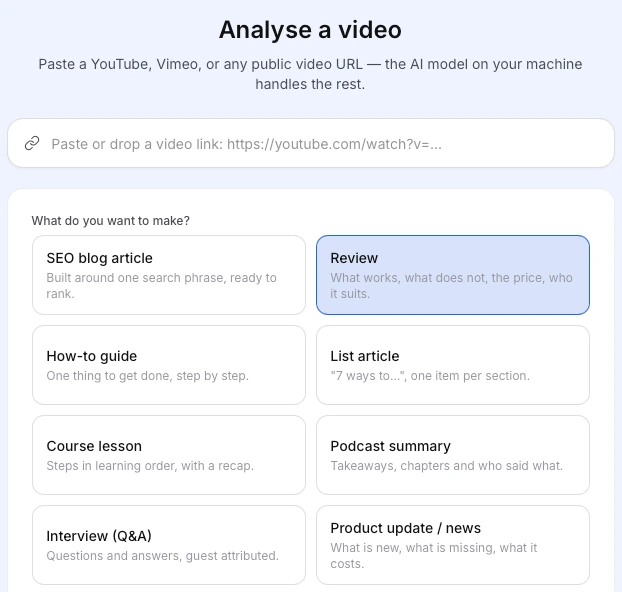
ReelBlog: paste a video link and choose what to make — SEO article, review, how-to guide and more

Find material

Search social media for the right videos.

Type a topic and ReelBlog finds matching videos from YouTube, Vimeo and TikTok — sorted by views, length and keyword fit. Pick one and start writing without leaving the app.

Buy now →

Autopublish

Connect your sites once. Publish from the app.

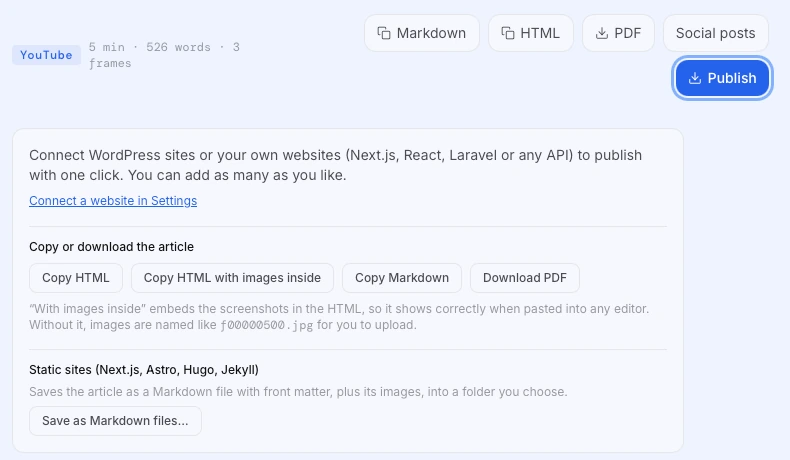
Built-in connections for all major platforms. Send the article live, save a draft or schedule it for later — all from inside ReelBlog. No copy-pasting.
  • WordPress
  • Shopify
  • Webflow
  • Ghost
  • Wix
  • Medium
  • Blogger
  • Notion
Buy now →
ReelBlog publish panel: connect WordPress or your own site, copy HTML or Markdown, download a PDF
  1. 01

    Local AI models

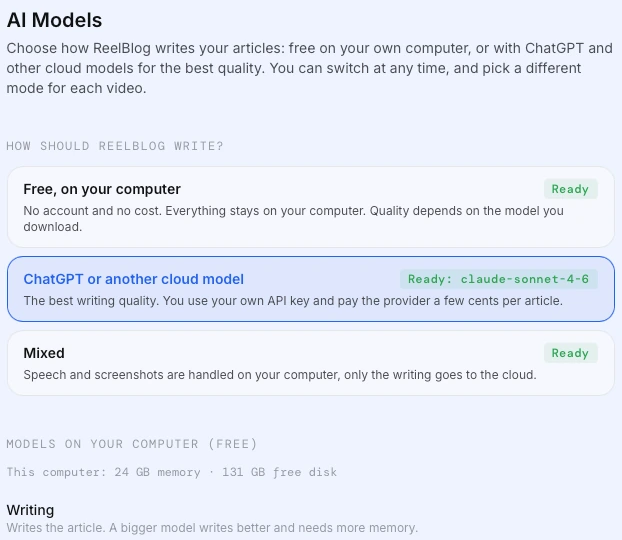
    Qwen, Llama and Mistral run entirely on your machine. No cloud, no recurring bill.
  2. 02

    Video transcription

    Accurate transcripts from YouTube, Vimeo, Loom or any local video file.
  3. 03

    Screenshot capture

    Key moments extracted as images and placed in the article automatically.
  4. 04

    SEO metadata

    Title, description, slug and keyword filled in before you open the draft.
  5. 05

    One-click publish

    Go live, save draft or schedule to 8 platforms directly from the app.

Functionalities

Everything you need
for video-to-blog
optimisation.

One app does the whole job — source, write, illustrate, optimise and publish. No stitching together five tools.

Buy now →

Why local AI

Smart AI, no dashboard digging
The AI lives on your computer. So does your money.

Cloud AI toolsReelBlog
Cost after 1 year$240 – $600$99, once
Articles per monthCapped by planUnlimited
Where your content goesTheir serversStays on your machine
Works offline✗ Requires internet✓ Fully offline
AI model qualityShared cloud poolFull speed on your hardware
Do the maths

What do you pay for cloud AI writing tools each month?
ReelBlog pays for itself in
4months
You keep $981 over 3 years
One-time $99 for ReelBlog Solo vs a $30/month subscription.
ReelBlog AI Models: write for free on your computer, or with ChatGPT or another cloud model
  • Qwen 2.5
  • Llama 3.2
  • Mistral 7B
  • OpenAI (optional)
  • Claude (optional)

Who it's for

Built for every content creator

01

YouTubers & video creators

Repurpose your existing library. Every tutorial, review and walkthrough becomes an indexed blog post that ranks on Google.

Buy now →
02

Course creators & educators

Turn lesson recordings into course pages, summaries and study guides. Learners find you on search, not just inside your platform.

Buy now →
03

Affiliate marketers

Build comparison and review articles at volume. Ten unboxing videos become ten money pages, published on a schedule.

Buy now →

Pricing

Transparent pricing,
no hidden costs.

Pay once. Every plan includes every feature.

Solo

$99one-time
1 computer
  • Unlimited videos & articles
  • All output types & publishing
  • 1 year of updates
  • Email support
Get started with Solo
MOST CHOSEN

Studio

$169one-time
3 computers · $56 each
Save 43% vs single licenses
  • Everything in Solo
  • Mac + PC + laptop
  • Priority email support
  • Transfer between machines
Get started with Studio

Team

$299one-time
5 computers · $60 each
Save 40% vs single licenses
  • Everything in Studio
  • Shared brand voices
  • Setup call included
  • Volume discount invoicing
Get started with Team
  • 14-day money-back guarantee
  • Secure payment with Stripe
  • License key by email in a minute

Add-on service

Post Scheduler

Queue your finished articles and let ReelBlog publish them for you on the days and times you choose — even when your computer is switched off.

$9.99/ month
  • Schedule posts to all 8 platforms
  • Publishes even when your computer is off
  • Unlimited scheduled posts
  • Cancel anytime
SubscribeCancel anytime from your billing portal.

Not sure yet? Download free — 2 full videos, no card required.

FAQ

01

Do I need a ChatGPT or other AI subscription?

No. ReelBlog installs free, open AI models that run on your own computer. If you already have an OpenAI key you can plug it in for extra quality, but it is optional.

02

Is it hard to set up?

No terminal, no config files. The installer downloads the AI model and sets everything up for you. Most people write their first article within 10 minutes.

03

What computer do I need?

macOS 12+ (Apple silicon or Intel) or Windows 10/11. 16 GB of RAM is recommended; 8 GB works with smaller models.

04

Which sites can it publish to?

WordPress, Shopify, Webflow, Ghost, Wix, Medium, Blogger and Notion are built in. Anything else works via REST API or webhook.

05

Is it really a one-time payment?

Yes. You pay once and keep the version you bought forever, including one year of updates. No monthly fees.

06

Can I move my license to a new computer?

Yes. Deactivate it on the old machine in Settings and activate it on the new one.

07

What does the Post Scheduler add?

It is an optional monthly service that publishes your queued articles on schedule from our servers, so posts go live even when your computer is off. It is $9.99 a month and you can cancel at any time.

Know today exactly what
your videos earn you.

First two videos are free. No card, no cloud, no monthly bill.

Mac & Windows · no card to try